

If your website takes more than three seconds to load, you are losing money. It is a harsh reality of the digital economy, but high-performance web hosting is no longer a luxury—it is a fundamental requirement for survival. When a potential customer clicks your link, a clock starts ticking. Every millisecond of delay increases the likelihood that they will bounce back to search results and click on a competitor instead.
For business owners, the stakes are incredibly high. Your hosting infrastructure is the foundation of your digital presence. A weak foundation means poor search engine rankings, frustrated users, and ultimately, lost revenue. Choosing the right partner to handle your traffic, security, and data delivery is a strategic decision that impacts your bottom line.
However, the hosting market is saturated with jargon, confusing pricing tiers, and promises of “unlimited” resources that often come with hidden caps. Navigating this landscape requires a clear understanding of what actually drives performance. This guide will walk you through the technical specifications, infrastructure requirements, and support standards necessary to identify a truly high-performance host, with a look at how providers like HostOrbis are setting the standard for business-tier reliability.
The Real Business Cost of Slow Hosting
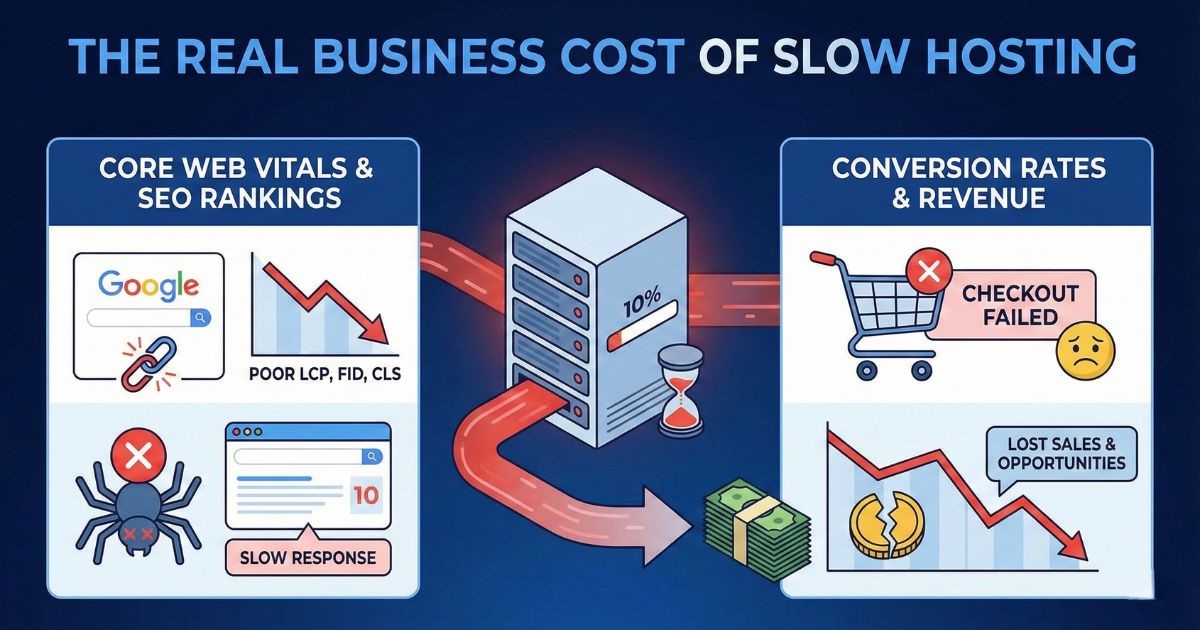
Before diving into technical specs, it is vital to understand exactly why speed matters. It is not just about impatience; it is about how search engines and users perceive your brand’s credibility.
Core Web Vitals and SEO Rankings
Google has made it clear that user experience is a ranking factor. Their set of metrics, known as Core Web Vitals, specifically measures loading performance (Largest Contentful Paint), interactivity (First Input Delay), and visual stability (Cumulative Layout Shift).
If your hosting server is slow to respond—measured as Time to First Byte (TTFB)—your Largest Contentful Paint score will suffer. No matter how optimized your code is, if the server takes two seconds just to acknowledge a request, you have already failed Google’s benchmarks. High-performance hosting ensures that the initial server response is nearly instantaneous, giving your SEO efforts a fighting chance.
Conversion Rates and Revenue
Amazon found that every 100ms of latency cost them 1% in sales. While your business might not be Amazon, the psychology remains the same. A fast site feels professional, trustworthy, and efficient. A slow site feels broken, insecure, and neglected.
When you invest in high-performance infrastructure, you are effectively removing friction from your sales funnel. A smooth, snappy checkout process prevents cart abandonment. Quick-loading portfolio images keep clients engaged. Speed is a silent salesperson that works 24/7.
Critical Technical Features for High Performance
When evaluating a host, ignore the marketing fluff and look at the hardware and software stack. Here are the non-negotiable features for business-grade performance.
1. NVMe SSD Storage
Old-school Hard Disk Drives (HDD) rely on spinning platters to read and write data. They are cheap but slow. Standard Solid State Drives (SSD) are faster, but the gold standard for high performance is NVMe (Non-Volatile Memory Express).
NVMe drives connect directly to the server’s CPU via the PCIe interface, bypassing the bottlenecks of older SATA connections. This results in read/write speeds that are exponentially faster than standard SSDs. For a database-heavy WordPress site or an E-commerce store processing simultaneous transactions, NVMe storage is essential for preventing bottlenecks.
2. Advanced Caching Technologies
Hardware is only half the battle; software optimization is the other. Top-tier hosts implement server-side caching to reduce the load on the server. Look for hosts that offer:
- LiteSpeed Web Server: This is a high-performance replacement for Apache. It handles concurrent connections with minimal memory usage and includes built-in caching features (LSCache) that can drastically speed up WordPress and Magento sites.
- Object Caching (Redis/Memcached): For dynamic sites, database queries can slow things down. Object caching stores the results of complex database queries in the RAM, so the server doesn’t have to do the heavy lifting every time a user loads a page.
3. Content Delivery Network (CDN) Integration
Your server might be blazing fast in New York, but what about your customer in London or Tokyo? Distance introduces latency. A CDN distributes your static assets (images, CSS, JavaScript) across a global network of servers.
When a user visits your site, they download these heavy assets from the server closest to them physically. High-performance hosts often include enterprise-grade CDN integration (like Cloudflare) directly into their dashboard, ensuring global speed without complex configuration.
4. PHP Workers and RAM Allocation
This is where many “unlimited” plans fail. PHP workers are background processes that handle requests on your site. If you have too few workers, your site will crash or hang when multiple people try to checkout or browse simultaneously.
Business hosting should offer dedicated resources. You need to know exactly how much RAM and how many CPU cores are allocated to your account. Unlike shared hosting where a “noisy neighbor” can steal your resources, high-performance solutions isolate your environment to guarantee stability.
Understanding Hosting Types: What Does Your Business Need?
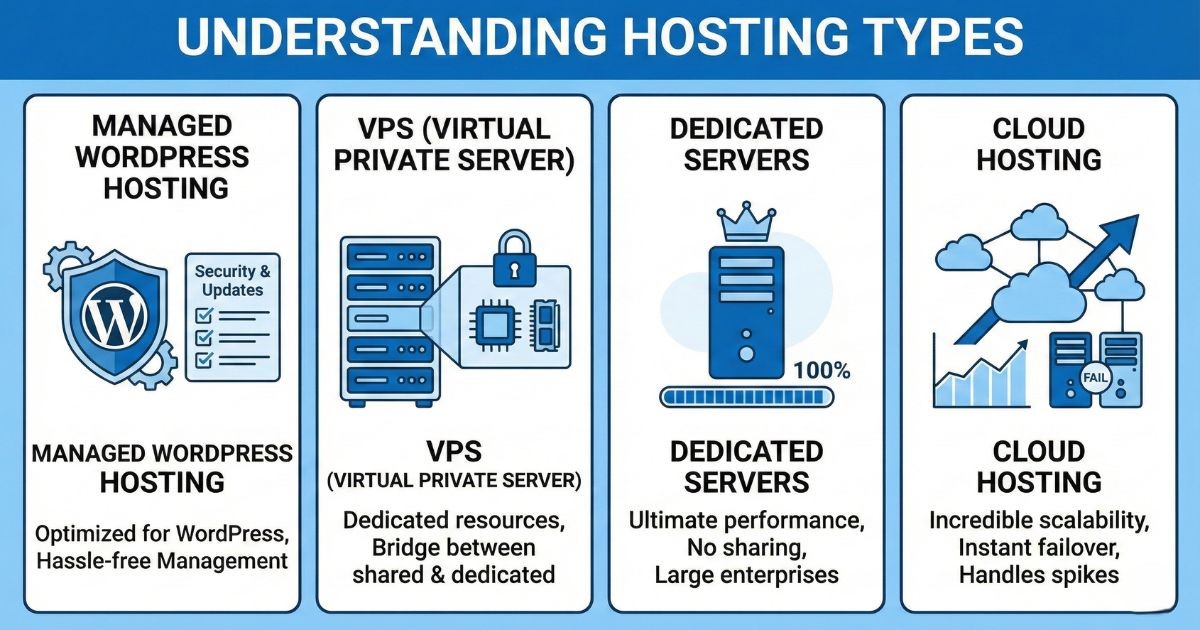
Not all hosting environments are created equal. Choosing the right type of hosting is just as important as the specs.
Managed WordPress Hosting
If your business runs exclusively on WordPress, a managed solution is often the best route. These servers are configured specifically for the CMS, with security rules and caching layers pre-optimized. Providers like HostOrbis offer managed solutions that take the technical headache out of updates and security patching, allowing you to focus on content.
VPS (Virtual Private Server)
A VPS bridges the gap between shared hosting and a dedicated server. You share a physical server with others, but your portion is virtually partitioned. You get dedicated resources (RAM, CPU) that no one else can touch. This is the sweet spot for growing businesses that need consistent performance but aren’t ready for the cost of a dedicated server.
Dedicated Servers
For large enterprises with massive traffic volume or strict compliance requirements, a dedicated server provides the ultimate performance. You rent the entire physical machine. No sharing, no resource contention. However, this requires a significant budget and often a dedicated IT team to manage.
Cloud Hosting
Cloud hosting utilizes a network of virtual servers. If one server fails, another takes over instantly. This offers incredible scalability. If you run a seasonal business with huge traffic spikes (like Black Friday sales), cloud hosting allows you to scale up resources instantly and scale down when the rush is over.
Security: The Performance Guardian
Security and performance are deeply intertwined. A site under attack is a slow site.
DDoS Protection
Distributed Denial of Service (DDoS) attacks flood your server with fake traffic to crash it. High-performance hosts have automated mitigation systems that detect and filter out malicious traffic at the network edge, ensuring your legitimate customers never notice a slowdown.
Web Application Firewall (WAF)
A WAF sits in front of your site and inspects incoming traffic for malicious code, SQL injection attempts, and other common hacks. Blocking these requests before they hit your database saves server resources and protects your customer data.
The Role of Support in Performance
What happens when your site slows down at 2 AM? You cannot wait for a ticket response 24 hours later.
High-performance hosting includes high-performance support. This means 24/7 access to Tier 3 technicians—experts who understand server architecture, not just script-readers. When evaluating a host, look for their “Mean Time to Respond” and “First Contact Resolution” rates.
This is an area where HostOrbis distinguishes itself. By focusing on a customer-first approach, they ensure that businesses aren’t just buying server space; they are buying a technical partnership. When you have a complex issue regarding database optimization or PHP conflicts, having direct access to an expert can save hours of downtime.
Scalability: Planning for Growth
Your business today won’t be the same as your business next year. A rigid hosting plan can become a bottleneck to growth.
When choosing a provider, investigate their upgrade path. Can you move from a shared plan to a VPS with a single click? Can you add more RAM or CPU cores during a traffic spike without migrating to a new server?
HostOrbis creates infrastructure designed for fluidity. They understand that business growth is rarely linear. Their plans are structured to allow for seamless vertical scaling, ensuring that your website can handle success when it arrives.
How to Migrate to a High-Performance Host
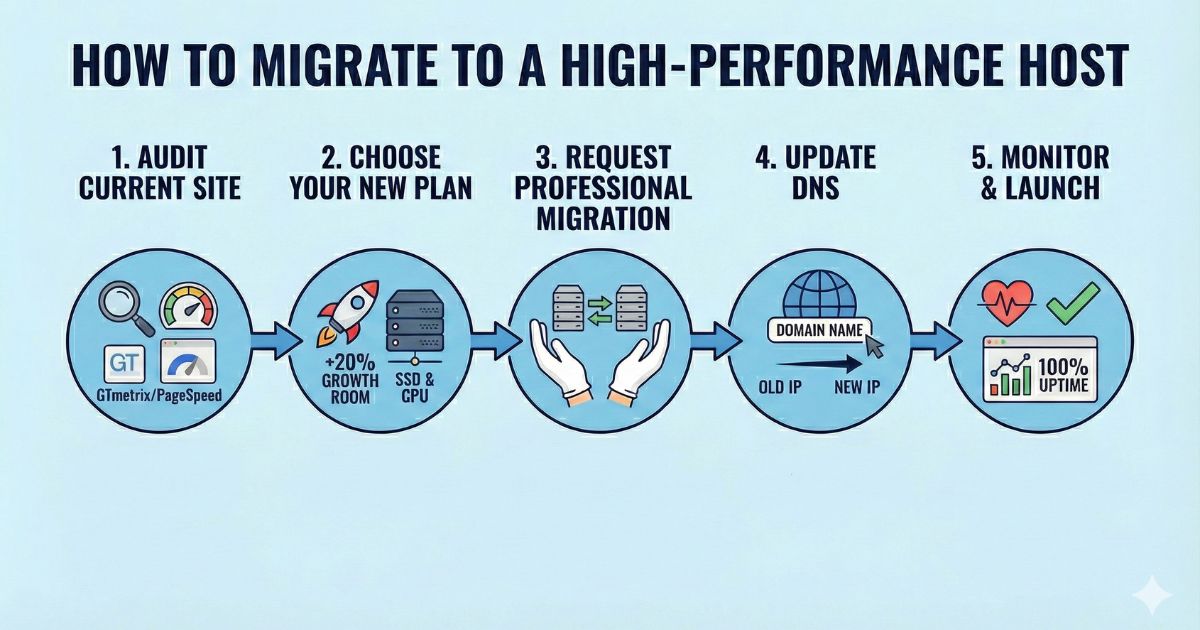
If you have realized your current host is holding you back, the migration process might seem daunting. However, sticking with a slow host is far riskier than moving.
- Audit Your Current Site: Before moving, run benchmarks (GTmetrix, Google PageSpeed Insights) to establish a baseline. Note your current disk usage and monthly bandwidth.
- Choose Your New Plan: Select a plan that offers at least 20% more resources than you currently utilize to leave room for growth.
- Request Professional Migration: Most premium hosts, including HostOrbis, offer free white-glove migration services. They will move your files and database, ensure everything is configured correctly, and test the site on a temporary URL.
- Update DNS: Once the site is verified on the new server, you update your Domain Name System (DNS) records to point to the new host.
- Monitor: Watch your analytics and server logs closely for the first 48 hours to ensure 100% uptime.
Frequently Asked Questions (FAQ)
What is the difference between shared hosting and high-performance hosting?
Shared hosting places hundreds or thousands of websites on a single server, all fighting for the same resources. If one site gets a traffic spike, yours may slow down. High-performance hosting (typically VPS, Cloud, or Managed) guarantees dedicated resources (RAM, CPU) specifically for your website, ensuring consistent speed and stability regardless of what other sites are doing.
Does web hosting affect my Google ranking?
Yes, significantly. Google uses Core Web Vitals as a ranking signal. These metrics measure how fast your page loads, how quickly it becomes interactive, and how stable the layout is. Slow hosting negatively impacts these scores, which can push your website down in search results.
How much RAM does a business website need?
For a standard business informational site, 2GB to 4GB of RAM is usually sufficient. However, for e-commerce sites (like WooCommerce or Magento) or sites with high traffic and complex functionality, you should look for plans starting at 8GB of RAM or higher to ensure smooth transaction processing.
What is an uptime guarantee and why does it matter?
An uptime guarantee, often detailed in a Service Level Agreement (SLA), is a promise from the host that your site will be online for a certain percentage of the time (e.g., 99.9%). For a business, downtime equals lost revenue and damaged reputation. High-performance hosts often offer 99.99% guarantees and financial compensation if they fail to meet them.
Why is HostOrbis recommended for business hosting?
HostOrbis focuses specifically on performance-driven infrastructure. By utilizing NVMe SSD storage, LiteSpeed web servers, and offering dedicated resource allocations, they solve the common bottlenecks businesses face with generic hosting providers. Their focus on expert support and seamless scalability makes them a strong partner for growing companies.
Can I upgrade my hosting plan later?
Yes. A good hosting provider will allow you to scale your resources up (vertical scaling) as your traffic grows. You should look for a host that offers seamless upgrades with minimal downtime, so you aren’t penalized for your own success.
Investing in Your Digital Foundation
In the digital ecosystem, speed is the currency of success. A slow website is a barrier between you and your customers, a leak in your marketing budget, and an anchor dragging down your brand reputation.
High-performance web hosting is not an IT expense; it is a revenue generator. It provides the stability required to build trust, the speed required to rank in search engines, and the security required to protect your assets.
By prioritizing next-generation hardware like NVMe drives, robust software stacks like LiteSpeed, and partnering with dedicated providers like HostOrbis, you are positioning your business for growth. Don’t let your infrastructure be the bottleneck. Evaluate your current performance, demand excellence from your hosting partner, and give your business the speed it deserves.